
Stream biosignals
in 60 seconds
Real-time EEG/EMG/ECG/EOG streaming at 250–500 Hz. WebSocket API. Browser dashboard. Works on Raspberry Pi, Linux, macOS, Windows.
Quick Start
Three commands to live EEG streaming
Install
Requires Python 3.10+. Auto-detects your hardware.
Stream
Starts WebSocket server on :1616 and dashboard on :1617
Connect
Open in any browser. Click Connect to start streaming.
Server Features
Everything you need for real-time biosignal acquisition
One-Line Install
pip install pieeg-server
WebSocket Streaming
Plain JSON at 250–500 Hz. No SDK, no binary protocol. Works in any language with WebSocket support.
Live Dashboard
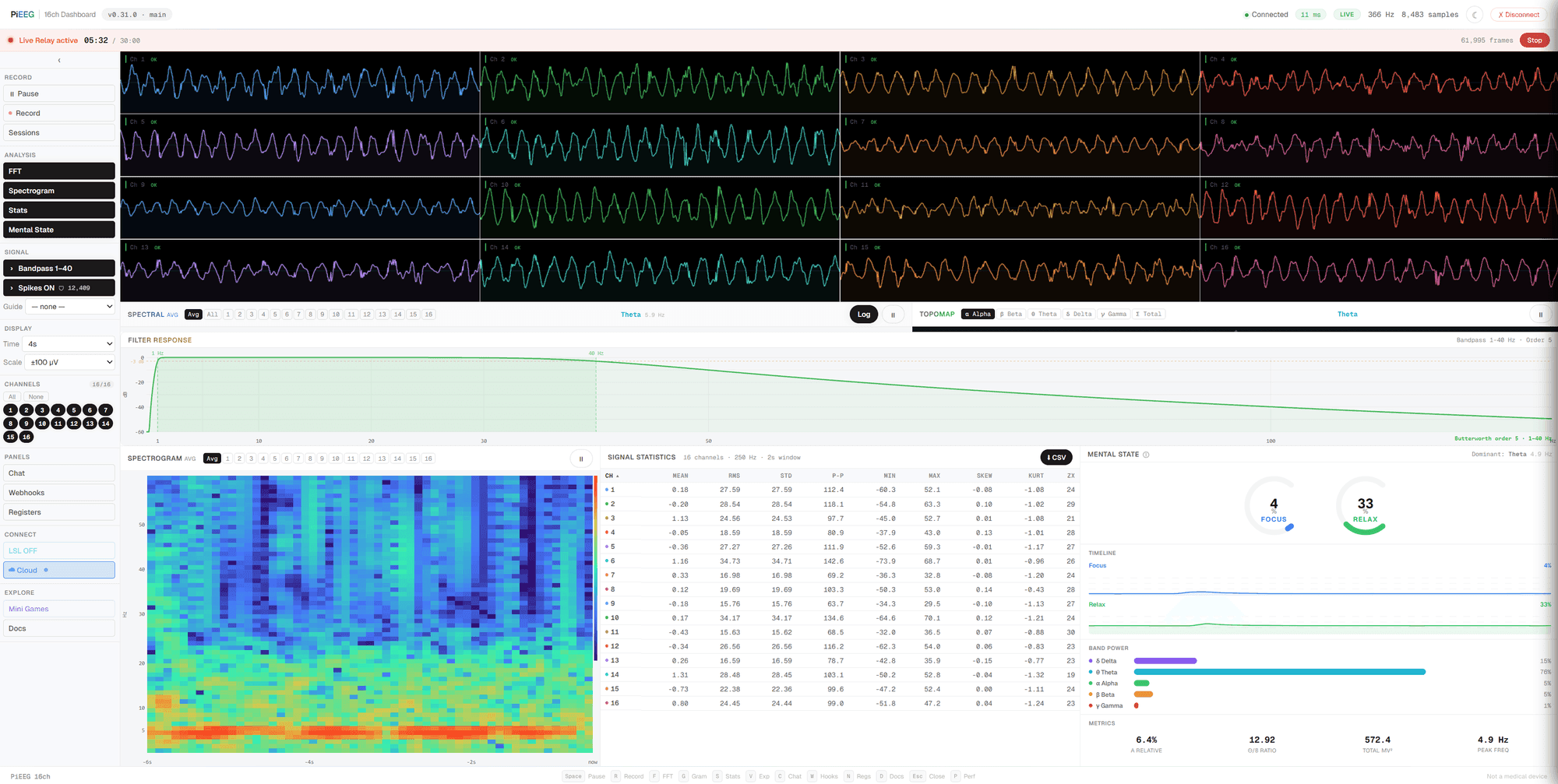
React-based web UI with real-time waveforms, FFT, spectrograms, topographic maps, and signal quality monitoring.
Record & Replay
CSV recording with annotations. Session library with playback controls (0.5×–2× speed).
WebSocket API
Plain JSON. No SDK. Works in any language.
Python Client
import asyncio, json, websockets

async def main():
    async with websockets.connect("ws://raspberrypi.local:1616") as ws:
        async for msg in ws:
            frame = json.loads(msg)
            # frame = {"t": 1711234567.123, "n": 42, "channels": [12.34, -5.67, ...]}
            print(f"Sample #{frame['n']}: {len(frame['channels'])} channels @ {frame['t']}")

asyncio.run(main())
JavaScript Client
const ws = new WebSocket("ws://raspberrypi.local:1616");

ws.onmessage = (e) => {
  const frame = JSON.parse(e.data);
  console.log(`#${frame.n}: ${frame.channels.length} channels`);

  // frame.channels = array of µV values per channel
  // frame.t = Unix timestamp (seconds)
  // frame.n = sample number (monotonic)
};
Data Format
Every frame is a JSON object with three fields:
tUnix timestamp (seconds)
nSample number (monotonic)
channelsArray of µV values
Supported Devices
One server, multiple hardware platforms
PiEEG
Raspberry Pi shield via SPI interface
IronBCI
Wireless BLE streaming
IronBCI-32
High-density USB serial acquisition
Mock Mode
Synthetic EEG with alpha rhythm, drift, noise, artifacts
Real-time Control
Send commands to the server over WebSocket
Filtering
Real-time Butterworth bandpass
Recording
Start/stop CSV recording
ADS1299 Registers
Live hardware configuration
Webhooks
HTTP callbacks on EEG events
Integrations
Connect to your favorite tools and platforms
VRChat OSC
Stream band powers to VRChat avatar parameters
--oscLab Streaming Layer
Compatible with OpenViBE, MNE, LabRecorder
--lslIFTTT & Zapier
Trigger webhooks when EEG conditions are met
webhooksJupyter Notebooks
Load CSV or stream live for analysis
notebooks/Supported Signal Types
Acquire any biosignal with the same hardware
EEG
Electroencephalography
EMG
Electromyography
ECG
Electrocardiography
EOG
Electrooculography
Start streaming in 60 seconds
No hardware? Try the live demo with synthetic EEG data.